Keep work moving
See today’s callbacks, follow-ups and site visits in Today, including any that are overdue. Move work through New, In progress and Handled, then archive it without losing the customer record.
FEATURES
From the first message to the final invoice: reply first, keep track of every job and get paid.
YOUR BUSINESS IN FOCUS
See where each enquiry stands, who is dealing with it and what needs to happen next.
Explore the business appThe sample workspace uses fictional details and simulated texts in the same interface as the live service.
See today’s callbacks, follow-ups and site visits in Today, including any that are overdue. Move work through New, In progress and Handled, then archive it without losing the customer record.
Read customer replies, use quick responses and see whether each text was queued, sent or delivered.
Book a site visit or a whole-day job straight from the enquiry, or add appointments and your own time. See the day, the week or the next four weeks as a list, and on a team plan everyone side by side. Foco estimates travel time between jobs, opens directions in one tap and keeps access notes, such as gate codes, parking and keys, for whoever is going. Accepted quotes wait on a To book list until they have a date, and customers get a confirmation by email or text with an Add to calendar link. Colleagues see your own time only as Busy.
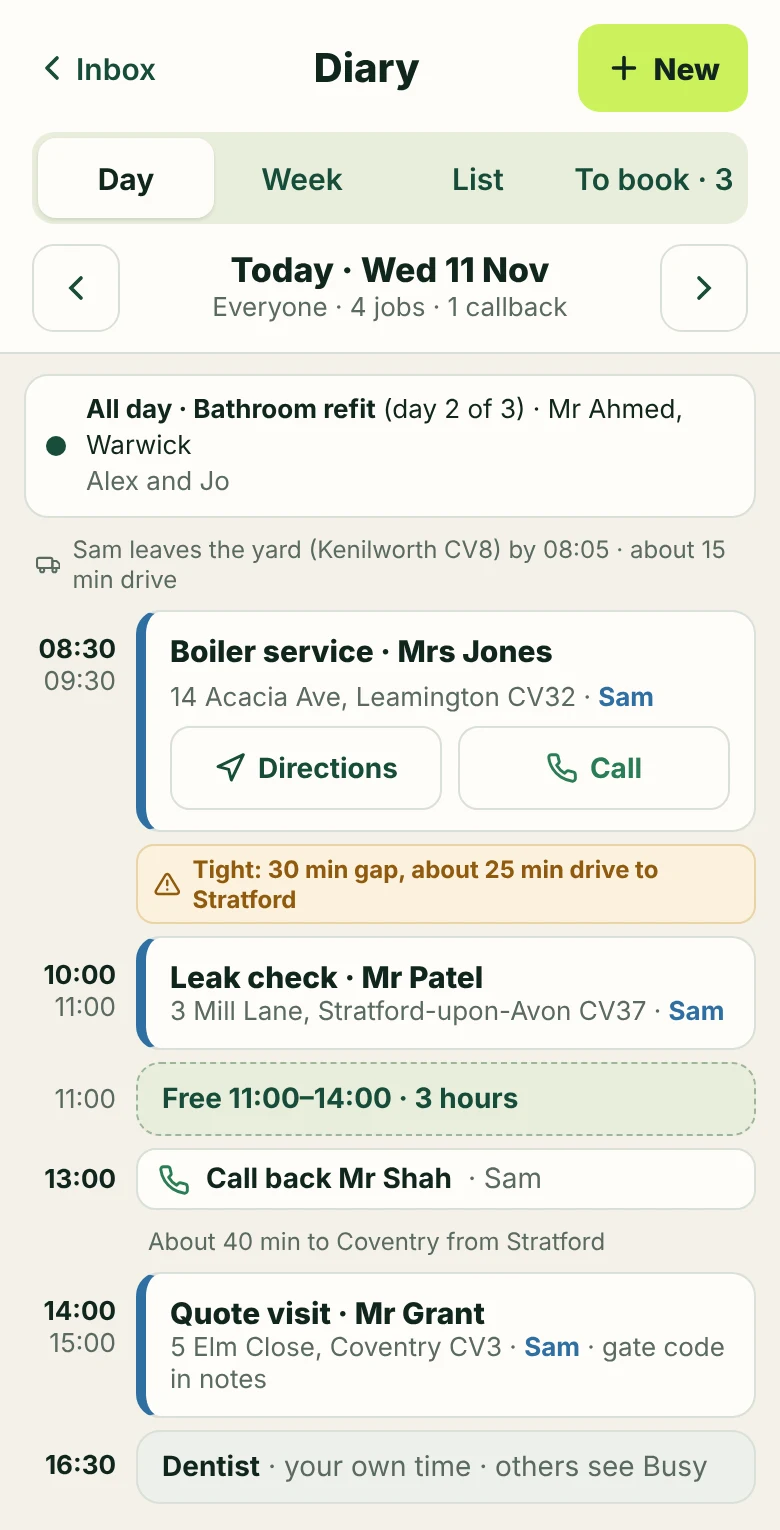
Set callbacks and site visits, and see them in the diary alongside your jobs. Changes and cancellations stay in the enquiry history. When a job is finished, set a reminder to contact the customer again, for example for a yearly service, and Foco reminds you on the day.
Choose alerts for new enquiries, customer replies, assignments, follow-ups and site visits. Tap an alert to open the right enquiry.
Recognise returning customers, review earlier enquiries and archive completed work without losing the record.
Keep a simple workspace for yourself, or assign enquiries to named people, share notes and make it clear who is responsible for the next response. Team members can be alerted when work is assigned to them. Give each site visit or follow-up to a named person; they’re told when it changes, and History shows who did what.
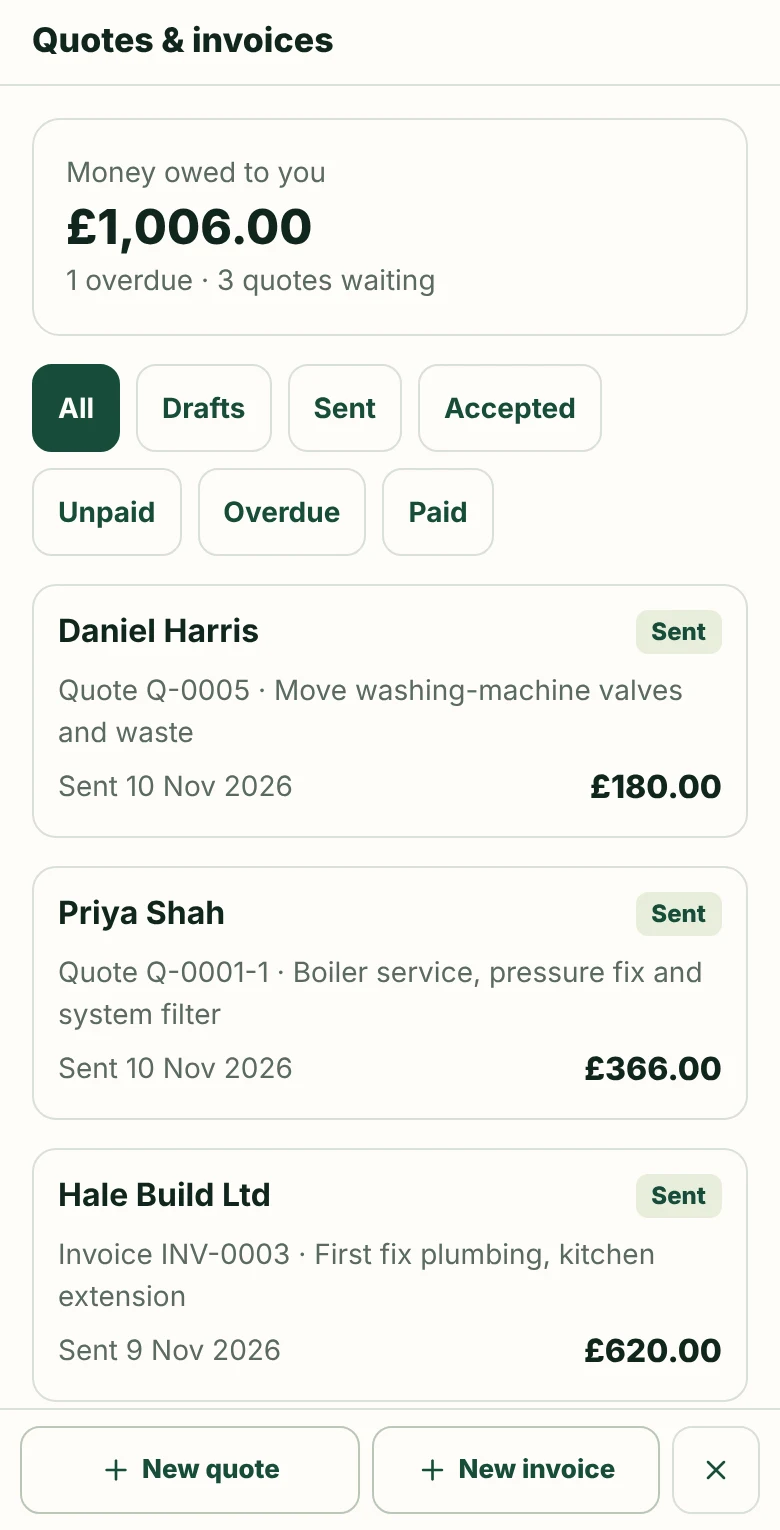
Create a quote from the enquiry with your own lines, VAT, CIS and an optional deposit, and email it as a PDF. Customers can accept it online. If a quote goes quiet, follow it up in one tap, or let Foco send a polite follow-up for you. Turn an accepted quote into an invoice, record payments and see what is still to be paid. Add your card payment link (for example SumUp, Square or Stripe) and customers get a Pay now button on the invoice and its email, plus a QR code on the PDF. Download your quotes and invoices for you and your accountant.
Switch on optional helpers to tidy up a rushed enquiry, catch up on a long conversation, pull out the job details or draft a reply. When you open a reply, Foco can suggest the next step. Every suggestion is yours to check and change, and nothing is saved or sent until you choose.
When a job’s done, ask the customer for a Google review with one tap, by email, text or both. Foco uses your own review link, shows when you last asked, and never sends anything without your tap.
ENQUIRIES WITHOUT THE INTERRUPTION
A customer calls while you’re busy on a job. You know you can probably help, but you don’t have time to stop and take every detail.
Tell them you’ll send your short enquiry form, then share it by text, WhatsApp or email. They can explain what they need and add helpful photos when it suits them.
Their completed enquiry arrives in Foco with their contact details and its own reference, ready for you or your team to pick up—without relying on hurried notes or memory.
A COMMON WORKING-DAY MOMENT
Acknowledge the customer without stopping to collect every detail.
Customers can describe the work and include useful photos.
The enquiry is recorded instead of being left in a call log or forgotten note.
Every route leads into the same searchable Foco workspace.
THE DETAILS THAT KEEP WORK MOVING
Every enquiry receives a unique reference in the customer’s automatic confirmation. Search for it in Foco when a customer calls or quotes the reference. If an enquiry arrives while you’re closed, the confirmation tells the customer when you’ll get back to them.
Keep one or more job addresses with the enquiry—not just the customer’s address. Confirm locations received by text, copy the details or open them directly in Maps or Waze.
Choose whether to measure First response time during your saved opening hours, including holidays and temporary closures. Recorded calls, personal texts and successfully sent business emails—including callback and site-visit confirmations—count. Automatic acknowledgements don’t count as a first response.
Switch between them in one tap, with alerts from each.
MORE THAN JUST A FORM
We find out what you need to know before contacting a customer, then set up the questions, enquiry process and workspace for you.
We help decide what customers should tell you before you call them back.
We connect Foco to your website and agree where new enquiries should appear.
We test the whole process, make sure enquiries arrive properly and adjust it when needed.
When you need help or want a change, you can speak to someone who already understands how your Foco setup works.
You stay in control. AI helps describe the job. Your business handles assessment, advice, prices and bookings.
BUILT WITH DATA PROTECTION IN MIND
Foco uses secure connections, controlled access and practical safeguards to help protect customer and enquiry information.
Read about privacy and securityShared or public computer mode requires a fresh sign-in and signs out after inactivity. Trusted devices can retain access only when you choose.
Access from lost or unused devices can be removed, while permissions keep sensitive actions under the business owner’s control.
Your enquiries, quotes and invoices are backed up automatically throughout the day. Every backup is encrypted, checked and stored separately from Foco itself, and we test full restores, so your business can be brought back quickly if something goes wrong.
Foco is hosted in Europe and every connection is encrypted. We never sell your data or use it for advertising.